Showing posts with label silhouette. Show all posts

Friday, November 18, 2011

Vinyl!! Plus links to Cameo Giveaways....I know you want one.

I have been playing around with my new Cameo and decided it was time to start vinyl-ing things. I knew that once I started, it would soon become an addiction, and I keep finding more things in my home that would benefit from the addition of vinyl. I also know that my newfound love of vinyl will more than likely transfer on to some upcoming Christmas presents, so I won't be posting those until after the holidays so as not to ruin the surprise for the recipient if they so happen to be reading this.


My first attempt at using vinyl came in the form of dressing up my Cameo. I am so in love with this. I got the peacock image from the Silhouette store (image peacock_C01202_23067 9/07/2011) I sized it to fit nicely on my machine and cut it out onto lovely purple vinyl. I was SO impressed with out intricate the cuts were on this. Yes it was a PITA to remove all the little bits, but I used my handy dandy hook tool and it made it a lot more easy than me trying to pick them out wth my fingernails.


For my second vinyl project, I decided that we needed to clearly mark our recycle bin in our kitchen. We were having people over for my husband's birthday and I knew I'd the question of "Hey, do you recycle" over and over. I did a quick google image search for a recycle symbol and used the Silhouette design software's trace functionality to cut this out onto black vinyl. I wasn't too happy with the way it came out, and you really can't tell unless you look very closely but the cut lines were not super clean on this one. I blame the image I used though, as it wasn't very crisp to begin with. All in all, it serves its purpose and I like how it turned out.


And now for the giveaway links. Just to let you know, I receive nothing by promoting these giveaways, in fact I'm sure these bloggers do not know I even exist. I follow them, and saw their giveaways and thought that one of my lovely readers may want to take their chance at winning an amazing machine. You can find the giveaways at:


If you happen to win one of these, please let me know so that I can do a happy dance with you! Gooooood Luck!


Monday, November 14, 2011

Fun with Vinyl!

My new Cameo arrived on Halloween and I've been so busy the past couple weeks that I haven't spent a whole lot of time get acquainted with it yet. Sad, I know. I did order some vinyl with my new machine, and had to come up with some projects to experiment with it, so I took my time to watch youtube videos before jumping in.

I found this adorable onesie over at Ashleyannphotography and knew that I wanted to replicate it for my friends daughter.

I got a great deal on heat transfer vinyl through a flash sale site called Scrapbook Steals. Mostly they just have scrapbook paper bundles, but they had one for Silhouette accessories last week, so I had to get in on that. The bundle I purchased came with glitter black heat and flocked white heat trasfer vinyl. I also purchased some more from Oh My Crafts since are running a 2/$20 on heat transfer.

For the onesie, I used the glitter black vinyl for the glasses, and downloaded the image glasses_1947 7/30/2009 from Silhouette. I resized it to fit on the onesie (5" wide) and set the cameo to cut it out, and followed the application instructions that came with the vinyl. I ended up having to increase the heat so that it was higher than what Silhouette suggested, but other than that, their instructions were spot-on. I bought some puffy paint for the "chain" and voila- here is the finished onesie:

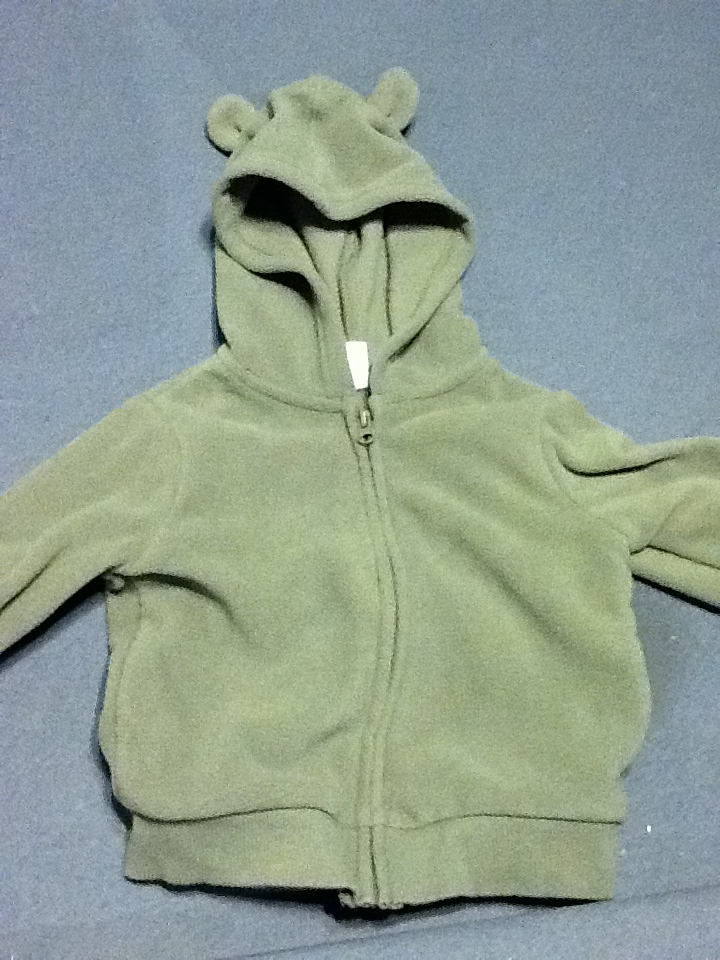
I also picked up a cute fleece hoodie from Target, that I did not notice at the time had ears on the hood, but that just added to the cuteness! I used dark pink heat transfer vinyl for this one, and the paw print is part of the Efon font, which I downloaded from dafont.com. I added her initials to the center of the paw print, making sure to flip the font horizontally, so that they are faced the right way when I apply it to the jacket.


Before:

After:


I can't wait to see my friends daughter wear these, and hopefully they like them!

Tuesday, November 1, 2011

Confession

I broke down and ordered a Silhouette Cameo! I know I just bought my sd, but I had no idea how much I was going to love it and realized that I was limited with the size of the sd. I found a great deal on the Cameo through Oh My Crafts and with a coupon code, I ended up paying the same price for it that I paid for my sd. Once I placed my order, I set-up my sd to sell on eBay, and I may end up losing a little on it, its so going to be worth it in the end. Plus, some lucky person is going to get my practically brand new sd for a great price. Its a win-win!

Wednesday, October 26, 2011

Pumpkin Carving

I am artistically challenge, in that I can't draw much more than a stick figure. Seriously. So when it came to carving pumpkins, I aways just opted for an easy toothy grin, because I just couldn't come up with any better ideas that I could draw out and execute. One of my best friends invited me over for pumpkin carving, and I was struggling with an idea, until I realized I could break out my silhouette and make a stencil!

Have I mentioned before just how much I love this machine? It has made craft projects so much more enjoyabe for me, and has greatly improved my crafting skillz. I have not been at a loss for projects since purchasing my silhouette, and I relly have no idea how I got by so long without it.

Okay, sorry about that gushing. Back to pumpkin carving.

I received an e-mail from Silhouette letting me know that all Halloween shapes were on sale for $.75! I browsed the online store until I found a shape that spoke to me. I chose the Owl Jack O Lantern -owl_jack_o_lantern_C20091027181311_19210 10/28/2009 and downloaded it into Silhouette Studio. I knew that I wanted to carve a big pumpkin, so I sized it as large as I could. I ended up going with freezer paper as my material because I knew it would lay the best on a bumpy pumpkin.

Here is what my pumpkin looked like after I got through carving it:

For the chest feathers, I decided not to carve all the way through, but scraped away the flesh from the pumpkin so that they would have a nice glow when a candle was placed inside.

And now for the pumpkin lit-up:


I realized that once I could see it lit, that my stencil was a wee bit crooked, but I think it turned out amazing!

Wednesday, October 19, 2011

A Harry Potter Onesie!

I have been a bad, bad blogger and haven't been around much. We have had a lot going on in our lives lately and I've been traveling a lot for work and we had to work in a vacation in there so my crafting time lately has been limited.

I was thankfully able to work in some craft time over the weekend, and made an adorable Harry Potter related onesie for a friend of mine who will be an aunt very soon. I decided to make a Gryffindor House-ish shirt and came up with this using my Silhouette SD and freezer paper. Man, so I LOVE freezer paper stencils!
I apologize for the poor photo. I couldn't find my camera and only had my phone handy.

To make this onesie, I downloaded a couple images from the Silhouette Store. For the tie, I used this neck_ties_C00066_22902  and for the crest I used one from this shield_set_C00982_20387. The Gryffindor "G" is just Helvetica font.

I decided to fancy this up a bit by using Tulip Pearl Scarlet Red fabric paint, which has a little bit of shimmer to it, which I think added a nice pop to this lovely onesie. I had to add a tiny drop of black to get it to the proper Gryffindor shade. For the gold, I used Tulip Sunshine Yellow fabric paint.

I really like how this one turned out and I see myself making Hufflepuff, Ravenclaw, and even Slytherin shirts in my future.

Monday, September 5, 2011

My First Freezer Paper Stencil Tutorial

I was finally able to sit down with my Silhouette and start to figure it out. I decided that an easy starter project would be a t-shirt made with a freezer paper stencil. I saw this great onsie on Pinterest and knew I would want to make this for friends who love all things Potter.

To get started, I downloaded a Harry Potter font on dafont.com, which is one of my favorite sites for free fonts. 

I then measured my shirt to determine how big I should make my stencil.

I opened up Silhouette Studio and created a new project. Since the shirt measured about 10 inches across,  I decided the stencil should be 7 inches wide.

I then cut my freezer paper just a bit larger then my stencil using a paper trimmer and placed the paper, shiny side down on the cutting mat. I tried to use the sticky mat and had horrible results when trying to peel the stencil off, so I switched to the less sticky mat.
I used the settings for vellum, and told my Silhouette to cut.

When it finishes, just peel the stencil off the mat. You'll have something that looks like this left on your mat
You will need to peel out the center of the remaining letters and use those to fill in the stencil on your shirt.

Before applying your stencil to your shirt, make sure that you have pre-washed and dried it in case it decides to shrink a bit. You should also iron your shirt before applying your stencil.

To apply your stencil, simply place it on your shirt and iron it in place using medium-high heat, until you are sure it is nice and secure. Then add the centers of your letters and iron in place. Make sure you are not using a steam setting on your iron, as this will mess up your stencil.

You are now ready to paint! I used Tulip permanent fabric paint, which can be found in a wide variety of colors and finishes at any craft store. I got mine during a sale a JoAnn's for around $1 for a small container. I then used a foam brush to evenly apply the paint.


To get the look I wanted, I applied 2 coats of paint and waited a couple hours for each coat to dry completely before applying the next. I also placed a piece of cardboard inside the shirt in case the pain decided to bleed through the fabric.

Once both coats were dry, I simply peeled off the freezer paper to reveal the finished product.


The instructions on the paint suggested that you heat-set the paint, so I took a dish towel that I folded in half, and placed that on top of the shirt and ironed it using high heat for about 30 seconds.

All in all, this was an easy project, and I'm sure I'll be making plenty more of these in the future.

Friday, September 2, 2011

Silhouette Update!!

I've been traveling for work this week, so haven't been able to post, or actually I haven't had much to post about as work travel doesn't allow much time for crafting. Anywho, I reached my goal and ordered a Silhouette SD! My machine arrived this past weekend, and as we were busy, I barely had enough time to pull it out of the box and install the software. I have big plans for this long weekend to start seeing what this machine is capable of. While I was out of town, I was able to look through Silhouette's online store and several blogs and Etsy shops to get some ideas,and I am pumped to get started!

I promise I will post my experiences this weekend.

Saturday, August 20, 2011

Saving Up for a Silhouette

I almost jumped on the Cricut bandwagon last year. I bought the Personal Cutter for a steal around Black Friday without doing any research amd when I got home, I pretty quickly realized that I had made an impulse purchase and regretted it. I didn't want to have to purchase a new cartridge (which can get very expensive) for every project I wanted to make, so I sold it on eBay, for a smidge bit more than what I paid for it. I then began to actually research what machine to buy and decided that the Silhouette SD was for me. The only problem was trying to justify the price tag.  I am typically a pretty frugal person and splurge on occasion, but just ask my husband, its hard for me to spend money on myself.

In order to pay for this new toy, I realized that I could buy one by re-selling leftover items from our wedding that have been sitting in our spare bedroom since March. I really just hoped that these things would sprout wings and take care of themselves, but, silly me, these are inanimate objects and therefore needed me to arrange new homes for them. I got out my camera and started snapping pictures and determining a fair price for them. I posted them on theknot and soon other knotties were taking interest. In just over a week I have sold almost enough to make my purchase (woohoo!) Just another couple of purchases will put me over the top and I can place my order and start new, exciting (to me) craft projects!! I really never thought I would get this excited over the thought of crafting, but I am super stoked at way lies ahead for me.